Thank you for Your Order!
Access your marketing template, full access marketing system,
bonus delivery system, selling chatbot and invitation to our community!
In the meantime... As promised,

Step 1: 🔐 All-in-One Bot for Real Estate Agents
Below you'll find all the resources you need to market,
sell and deliver this course online!
🔐 All-in-One Bot for Real Estate Agents
Revolutionize Your Real Estate Business with Our All-in-One Automation Tool!
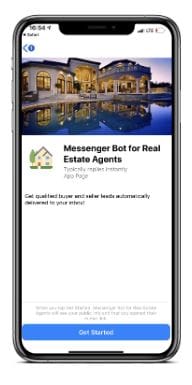
Transform how you connect with clients and manage property listings with our comprehensive real estate bot designed for Messenger.
Whether buyers, sellers, or realtors, our bot ensures a streamlined, efficient, and engaging experience for everyone involved. Here’s how it can elevate your real estate operations:
Seamless Initial Interaction
Messenger Welcome Message: Introduce your services with a friendly and informative greeting that helps users navigate through the bot’s capabilities.
Messenger Main Menu: Provide easy access to all features, including buying, selling, and consultations, ensuring a user-friendly experience right from the start.
Messenger Default Reply: Deliver helpful responses to any inquiries that aren’t immediately recognized, guiding users towards the information they need.
Targeted Assistance for Every User (17 Flows)
Buyer & Seller Menus: Tailor the experience with specific options for buyers and sellers to address their unique needs efficiently.
Realtor Specific Services: Offer realtors tools and resources like listing updates and client management options directly through the bot.
Talk to a Human: Ensure users can easily escalate their inquiries to a live agent, blending automated efficiency with personal touch.
Update Account Details & Unsubscribe from Bot: Allow users full control over their account settings and subscription preferences, enhancing user satisfaction and trust.
Localized Property Searches
Neighborhood Specific Searches: Enable property searches within popular neighborhoods like Coral Way, Little Havana, and Wynwood, providing tailored results that match user preferences.
Engagement and Follow-Up
First Follow-Up Sequence for Buyers and Sellers: Automate follow-up communications to keep potential clients engaged, providing them with tailored information and updates based on their interactions.
Contact Details: Make it easy for users to reach out with questions or to schedule viewings, driving more interactions and potential sales.
Subscription Management
Subscribe to Bot: Allow new users to subscribe easily to receive updates and notifications, keeping them informed and connected to your services.
The All-in-One Bot for Real Estate Companies is not just a tool—it’s an integral part of your team, designed to enhance client interactions, streamline operations, and boost your sales effectiveness.
Embrace the future of real estate with a bot that works tirelessly to support your company's growth and client satisfaction.
Cloning your entire automation and Flow Sharing are useful features in case you need to transfer the content.
But imagine you want to share your whole bot with a client or a community of friendly bot builders and include everything you have — Tags, Custom User Fields, and Actions.
Now you can do it with Templates!
For today's Manychat Tutorial we will cover the 3 steps of How to Install Templates. The steps consist of reviewing the content of the template, choosing the page you wish to install the template to and selecting some final key elements. Then you're ready to install.
Additionally, you can clone your entire Facebook messenger bot and Flow Sharing, for if you ever need to transfer content or want to share your bot.
If your template has PRO features, it will require to have Paid Manychat account to receive the PRO features of the template design.
BOLD Highlights in the Flow Area are designated PRO features and require a ManyChat Pro Subscription.
1. Review the Template contents.
All items will be placed in relevant sections (e.g. installed Growth Tools can be found in your Growth Tools Section). Unattached Automations will be placed in the new folder in Automations Section.
2. Choose the destination Account this Template will be installed on.
Pro Template can be installed only on a Account with Pro subscription. Free Template can be installed on any Account.
3. Manage General Elements.
In case this Template contains Main Menu, Welcome Message, or Default Reply, you’ll be able to replace your current ones automatically (your existing Automations will be stored in Automations Section). Please note that new Main Menu will replace the old one completely.
3 General
Messenger Main Menu
Messenger Welcome Message
Messenger Default Reply
2 Keywords
Message is stop, unsubscribe
Message is start, subscribe
1 Sequences
First follow-up sequence
17 Flows
Main menu
Buyer
Seller
Realtor
Talk to a human
Update account details
Unsubscribe from bot
Welcome Message
Contact details
Default Reply
Subscribe to bot
Neighbourhood
Search criteria: Coral Way
Search criteria: Little Havana
Search criteria: Wynwood
First follow-up: Buyer
First follow-up: Seller

Step #2Bonus Marketing Systeme IO Chatbot

Step #3Bonus Affiliate Delivery System
A BONUS Delivery system specifically structured for maximum conversions.
CLICK HEREto get access to the Affiliate Marketing System
Step #4Final Step!

Get advice, assistance and additional templates
& Resources for your business venture.
BONUS: Advantage Integrated Management System (AIM)


Thanks for your Business! Schedule Your Courtesy Business Business Consultation.
Recommended Lead Magnet Resources
Get Systeme.io for Free
Systeme.io is the only tool you need to launch your online business.