Thank you for Your Order!
Access your marketing template, full access marketing system,
bonus delivery system, selling chatbot and invitation to our community!
In the meantime... As promised,

Step 1: 📜 Lead Generation for Insurance Companies
Below you'll find all the resources you need to market,
sell and deliver this course online!
Enhance Your Insurance Lead Generation with Our Advanced Bot for Insurance Companies!
Welcome to a revolutionary way to manage and generate leads for your insurance business.
Our specialized Lead Generation automation for Insurance Companies on Messenger is designed to streamline the customer journey, making it easier for potential clients to get quotes, provide necessary information, and engage directly with your company.
Here’s how our automation tool can optimize your lead generation process and improve customer interactions:
Seamless Introduction and Navigation
Welcome Message: Kick off interactions with a warm and informative greeting that clearly explains how the bot can assist users, guiding them through various options for insurance queries and data submission.
Main Menu: Offer a comprehensive main menu that allows users to easily navigate through different insurance options, including individual plans, family coverage, and group insurance packages, enhancing user experience and interaction efficiency.
Efficient Communication and Data Collection (22 Flows)
Insurance Plan Survey Flows: Guide potential clients through a series of detailed surveys to capture essential information about their insurance needs. These include starting the survey, completing it, and handling specific questions tailored to individual or family insurance needs such as supplemental insurance, short-term coverage, health plans, and more.
Group Insurance Flows: Address the needs of business clients with flows dedicated to collecting company info, insurance plan preferences, and broker interactions, ensuring that all relevant data for group policies is efficiently gathered.
Contact Information Collection: Securely collect contact details as part of the survey process to facilitate follow-up communications and personalized insurance quotes.
Live Chat & Ask Me a Question: Provide options for live interactions when users need to discuss specific details or require personal assistance from an insurance expert.
Targeted Keywords and Quick Responses (2 Keywords)
Keywords related to plans and quotes: Allow users to easily initiate interactions about different insurance plans and request free quotes, streamlining the lead qualification process.
Navigational keywords like 'menu' and 'start': Help users easily return to the main menu or restart their inquiry, enhancing usability and engagement.
Proactive Follow-Up and Engagement (1 Sequence)
First Follow-up Sequence: After initial contact, automatically engage potential clients with follow-up messages that provide additional information, remind them to complete their surveys, or offer personalized insurance quotes based on provided data. This sequence is crucial for maintaining engagement and moving leads further down the conversion funnel.
Our Lead Generation Bot for Insurance Companies is more than just a tool; it's an integral part of your sales strategy designed to capture and nurture leads more effectively.
By automating the initial stages of customer interaction and data collection, you not only streamline your processes but also ensure that potential clients receive timely and relevant follow-ups.
Implement this bot to transform how you attract and convert leads in the competitive insurance market!
📜 Lead Generation for Insurance Companies
Generate and qualify leads for your insurance agency
- qualify and ask the right set of questions accordingly
Introduces visitors with a wide variety of insurance coverage and shares the basic information about each option to help them find the right one.
If a visitor needs to learn more regarding a specific insurance plan, and ask an appropriate set of questions, gathers contact details and sends the info to the insurance professionals have more time to contact and close more sales
Lead generation and conversion
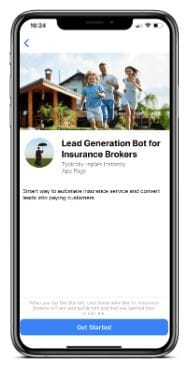
Get a smarter way to automate your insurance service, provide for quick, accurate, affordable rates and convert visitors into paying customers.
Customer segmentation
Customer segmentation features offer customized customer experience based on personal surveys and make it easier for insurance professionals to deliver personalized quotes.
Cloning your entire automation and Flow Sharing are useful features in case you need to transfer the content.
But imagine you want to share your whole bot with a client or a community of friendly bot builders and include everything you have — Tags, Custom User Fields, and Actions.
Now you can do it with Templates!
For today's Manychat Tutorial we will cover the 3 steps of How to Install Templates. The steps consist of reviewing the content of the template, choosing the page you wish to install the template to and selecting some final key elements. Then you're ready to install.
Additionally, you can clone your entire Facebook messenger bot and Flow Sharing, for if you ever need to transfer content or want to share your bot.
If your template has PRO features, it will require to have Paid Manychat account to receive the PRO features of the template design.
BOLD Highlights in the Flow Area are designated PRO features and require a ManyChat Pro Subscription.
1. Review the Template contents.
All items will be placed in relevant sections (e.g. installed Growth Tools can be found in your Growth Tools Section). Unattached Automations will be placed in the new folder in Automations Section.
2. Choose the destination Account this Template will be installed on.
Pro Template can be installed only on a Account with Pro subscription. Free Template can be installed on any Account.
3. Manage General Elements.
In case this Template contains Main Menu, Welcome Message, or Default Reply, you’ll be able to replace your current ones automatically (your existing Automations will be stored in Automations Section). Please note that new Main Menu will replace the old one completely.
3 General
Messenger Main Menu
Messenger Welcome Message
Messenger Default Reply
2 Keywords
Message is plan, quote, free, free quote, start plan
Message is menu, main, main menu, begin
1 Sequences
First follow-up: Sequence
22 Flows
Main menu
Live chat
Ask me a question
Default Reply
Welcome Message
Insurance plan: start survey
Insurance plan: survey completed
Individual/Family: q2.1_Supplemental
Individual/Family: q3_Cover
Individual/Family: q2.1_Short-term
Individual/Family: q2_Health plan
Individual/Family: q1_Address
Individual/Family: q3.1_Cover
Individual/Family: q5_Contact information
Individual/Family: q4_Details
Group: q2_Insurance plan

Step #2Bonus Marketing Systeme IO Chatbot

Step #3Bonus Affiliate Delivery System
A BONUS Delivery system specifically structured for maximum conversions.
CLICK HEREto get access to the Affiliate Marketing System
Step #4Final Step!

Get advice, assistance and additional templates
& Resources for your business venture.
Recommended Lead Magnet Resources

EXTRA SUPER BONUS: Advantage Small Business Legal Bundle

Is Your Business @ Risk?
Are you making any of the Top 10 Small Business Legal Mistakes?
Find Out If You Are Making this common "Business Building" Mistake?
Get Systeme.io for Free
Systeme.io is the only tool you need to launch your online business.