Thank you for Your Order!
Access your marketing template, full access marketing system,
bonus delivery system, selling chatbot and invitation to our community!
In the meantime... As promised,

Step 1: 😬 Dentist Appointment Scheduling
Below you'll find all the resources you need to market,
sell and deliver this course online!
😬 Dentist Appointment Scheduling
Enhance Your Dental Practice with Our Cutting-Edge Dentist Chatbot!
Welcome to the future of dental care management!
Provide patients with the highest quality dental care in a comfortable, relaxed and friendly environment
Motivate your customers with your business and unique services.
Let them find your service at anytime and anyplace.
Grow your dental practice and improve patient experience by using fully automated technology to provide patients with the highest quality dental care in a comfortable, relaxed and friendly environment
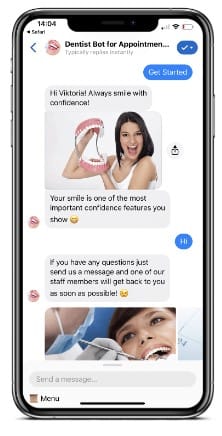
Our specialized Dentist Chatbot for Messenger is tailored to streamline appointment scheduling and improve patient communication, making dental care more accessible and efficient for everyone.
Here’s how our bot can transform your dental practice:
Immediate and Welcoming Communication
Messenger Welcome Message: Greet patients with a warm and inviting message that explains how they can navigate through the bot to access dental services, schedule appointments, or get answers to their questions.
Messenger Main Menu: Provide easy access to all essential services such as viewing available treatments, requesting appointments, or finding clinic information, ensuring a user-friendly experience from the start.
Messenger Default Reply: Deliver helpful responses to any inquiries that aren’t immediately recognized, guiding patients towards the information they need.
Simplified Patient Interaction (9 Flows)
Main Menu: Allow patients to easily navigate back to the main options at any point during their interaction, enhancing user experience and satisfaction.
Our Services: Showcase your dental services, offering detailed descriptions and information that help patients understand what you provide.
Request an Appointment Survey: Engage patients with a quick survey to understand their needs before booking an appointment, ensuring they receive the most appropriate care.
Location: Provide easy access to your clinic’s location, helping new and existing patients find their way to your office effortlessly.
Come Inside: Offer a virtual tour or instructions on how to navigate your clinic once they arrive, easing any anxiety about visiting a new place.
📨 Send Us a Message: Facilitate direct communication for patients to ask questions, get support, or discuss their dental care needs.
First Follow-Up: Automatically follow up with patients who have interacted with the bot but have not completed an appointment booking, keeping them engaged and encouraging them to take the next step.
Responsive and Engaging (3 Keywords)
Message contains Hi, Hey, Hello: Start conversations with a friendly and professional response, instantly making patients feel welcome and valued.
Message contains menu, main, back: Allow patients to easily navigate back to main menus or correct previous inputs, enhancing their control over the chat experience.
Message contains order, appointment, consultation, free, book: Quickly guide patients to make appointments or order services such as a free consultation, streamlining the conversion process from inquiry to booking.
Seamless Follow-Up Communication
First Follow-Up Sequence: Engage patients after their initial interaction, providing additional information or reminders to book an appointment, ensuring you capture and retain their interest.
Our Dentist Chatbot is more than just a scheduling tool; it’s a comprehensive solution designed to improve patient care and office management.
By integrating this bot into your practice, you not only make dental services more accessible but also enhance the overall patient experience, leading to higher satisfaction and increased loyalty.
Start leveraging the power of automation today and watch your practice grow!
Cloning your entire automation and Flow Sharing are useful features in case you need to transfer the content.
But imagine you want to share your whole bot with a client or a community of friendly bot builders and include everything you have — Tags, Custom User Fields, and Actions.
Now you can do it with Templates!
For today's Manychat Tutorial we will cover the 3 steps of How to Install Templates. The steps consist of reviewing the content of the template, choosing the page you wish to install the template to and selecting some final key elements. Then you're ready to install.
Additionally, you can clone your entire Facebook messenger bot and Flow Sharing, for if you ever need to transfer content or want to share your bot.
If your template has PRO features, it will require to have Paid Manychat account to receive the PRO features of the template design.
BOLD Highlights in the Flow Area are designated PRO features and require a ManyChat Pro Subscription.
1. Review the Template contents.
All items will be placed in relevant sections (e.g. installed Growth Tools can be found in your Growth Tools Section). Unattached Automations will be placed in the new folder in Automations Section.
2. Choose the destination Account this Template will be installed on.
Pro Template can be installed only on a Account with Pro subscription. Free Template can be installed on any Account.
3. Manage General Elements.
In case this Template contains Main Menu, Welcome Message, or Default Reply, you’ll be able to replace your current ones automatically (your existing Automations will be stored in Automations Section).
Please note that new Main Menu will replace the old one completely.
3 General
Messenger Main Menu
Messenger Welcome Message
Messenger Default Reply
3 Keywords
Message contains Hi, Hey, Hello
Message contains menu, main, back
Message contains order, appointment, consultation, free, book
1 Sequences
First follow-up sequence
9 Flows
Main menu
Our services
Request an appointment survey
Location
Come inside
📨 Send us a message
Default Reply
First follow-up
Welcome Message

Step #2Bonus Marketing Systeme IO Chatbot

Step #3Bonus Affiliate Delivery System
A BONUS Delivery system specifically structured for maximum conversions.
CLICK HEREto get access to the Affiliate Marketing System
Step #4Final Step!

Get advice, assistance and additional templates
& Resources for your business venture.
Recommended Agency Offers

BONUS: Agency Advantage Smart Clients (ASC)

Agency Marketing Owners Solutions and Entreprenuers. Advantage Smart Clients
Get Systeme.io for Free
Systeme.io is the only tool you need to launch your online business.